Archive | May 2017
Publicity Tips for Book Authors

What Do You Do for People?|
For Media?
Below is an excerpt from a long-ago issue of Paul Hartunian’s Million Dollar Publicity Strategies ezine.
I just read a brochure produced by an interior decorator. I now see why most of these people are starving. Here are the first two sentences I read in that brochure:
“Hello Everyone, Welcome to my world.”
What do I possibly care about her world?
What do I really care about? What’s the *only* thing I care about? If you said the only thing I care about is what she can do for me, you are right on target.
So many people approach the media people the same way. They actually think reporters, editors, talk show hosts, etc. really care about their book, their product, their service or their whatever.
They don’t care. Nobody cares.
The only thing people care about is what you…
View original post 177 more words
Writing a Substantive Book Review

 Ah, the book review. The bane of authors everywhere. Unknown authors want more of them, well-known authors want reviewers to be nicer.
There is a formula for writing book reviews—ones that help readers make a decision and, positive or negative, help authors know what works in the work and what doesn’t.
Check out this post at AIW Press to learn the four-step process to writing a substantive review, and read through to the end for some helpful tips.
Framing Your Story – Book Formatting Basics: The End – Guest Post by Allie Potts…

You’ve been toiling for hours upon hours. Edited to a glossy shine, your manuscript is finally complete.
Unfortunately, a complete manuscript is not the same thing as a book interior. The difference is formatting.
If a complete manuscript is your masterpiece, consider formatting the frame in which your masterpiece is viewed. Proper framing enhances the work, while improper framing detracts. Even worse, nothing screams amateur quite as loudly as improper framing.
So how does one ensure proper framing?
For one, start sweating the details.
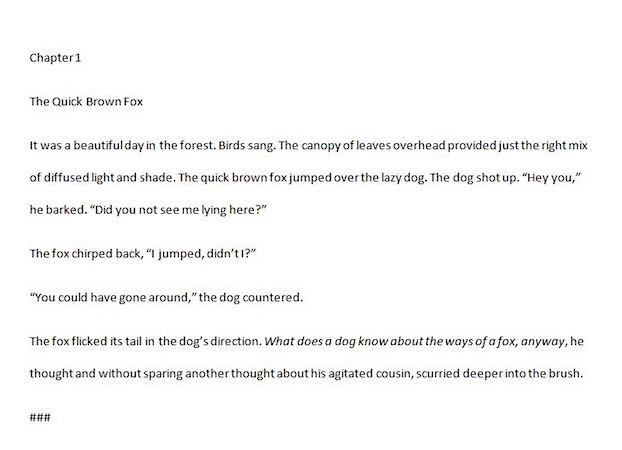
This example shows basic text written left justified on 8×11 paper. It is readable, but there is nothing to pull the eye to the page, let alone, a reader into a story.
Adjust your page size
When setting your book up for publishing you will be asked to specify a trim size, which is a fancy way of saying set your page length and width. You…
View original post 585 more words
Let’s Walk a Marathon – Intermittent Fasting and new series of Cook from Scratch
Things to Never Say to a Writer


by Elisabeth Wong
Alright, there’s just no denying it: we’re crazy. We just… we’re… I mean, yeah, everyone’s crazy to a certain extent, but being a writer is like the legal, non-institutionalized way of actually being insane.
Look at us. We talk about characters like they’re real or something. (Which they are, just… just by the way.)
Chances are, you’ve got a friend/ex-friend(?) who loves/loved to write. And you’re not exactly sure how to deal with this social recluse, this person who feels like they live more in a novel than in the actual world.
View original post 676 more words
How to make a book teaser #WriterWednesday #AuthorMarketing #Marketing
This gallery contains 6 photos.
Editing Mock-Ups in Photoshop (In 12 Steps)

I didn’t plan on sharing this but as I was editing some mock-ups I thought it would be nice to share what I am doing.
I am not a professional photographer, and I don’t always have a chance to take professional images. Therefore, I love using free mock-up templates to create professional images of my books. I am learning Photoshop also because if I can master it, I can also start to create my own book covers! (OK, that’s a far way off but a sista can dream).
But, while I am finagling (am I the only one who thinks finagle is a funny word?) around with this, I decided to put together a quick tutorial on what I am doing for those of you who use Photoshop. It’s super easy and if you have Photoshop, you should be able to get started right away.
Note:…
View original post 696 more words
Digital Book Signing

Hello SEers! Harmony here 🙂
Today, I’d like to take a look at how to offer autographs on your digital books using Authorgraph. Also, you can get this service embedded on your blog/website rather easily. How cool is that?
With Authorgraph, you can send, request, or receive author autographs. It’s easy to sign up (for FREE) using this link: https://www.authorgraph.com/signin
This takes you to a page that looks like this:
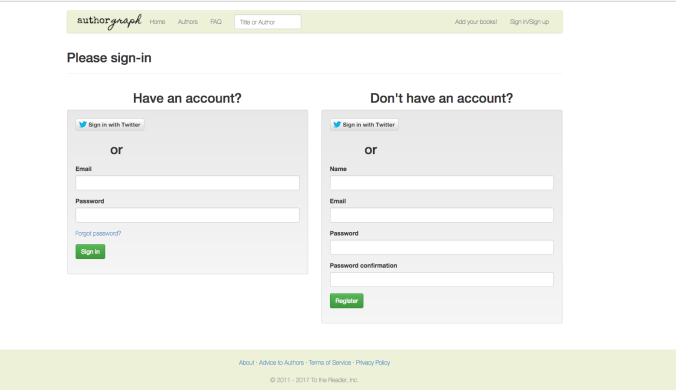
Once you’ve signed in, you have a few options:
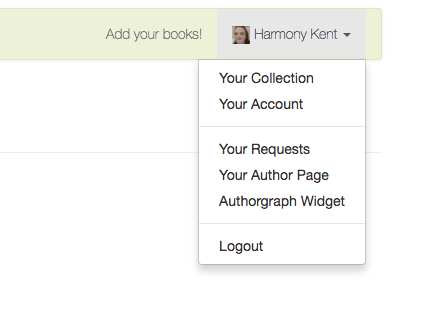
You can add all of your ebooks, as long as you have them listed on the Amazon platform. You will need an Amazon ASIN for each book, which you can find in a number of places such as your KDP account books page or your book sales page. Once you have that, then input it as so …
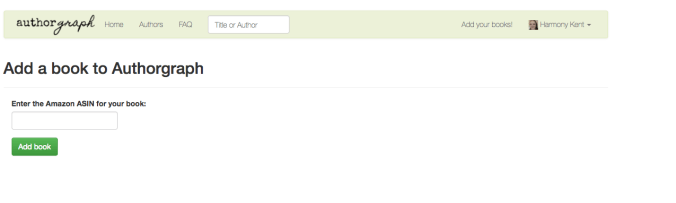
And click on ‘Add Book’.
Repeat this for each of your Amazon ebooks.
View original post 417 more words
 When Angels Fly